Example
Configuration-driven data pipelines powered by ETLX
Example - ETLX & Data Pipelines
This page walks through a real-world ETLX pipeline, showing how a single markdown configuration can describe:
- Data ingestion
- Transformations
- Data quality rules
- Governance artifacts
- Exports
- Logging
All driven by configuration and executed step-by-step through the ETLX UI.
The example uses the NYC Yellow Taxi - January 2024 dataset as a concrete and realistic scenario.
Getting Started with ETLX Pipelines
When you first open the ETLX menu, the system displays an empty CRUD table, when added pipeline its shown.
This table represents your pipeline registry — each row corresponds to one ETLX configuration.
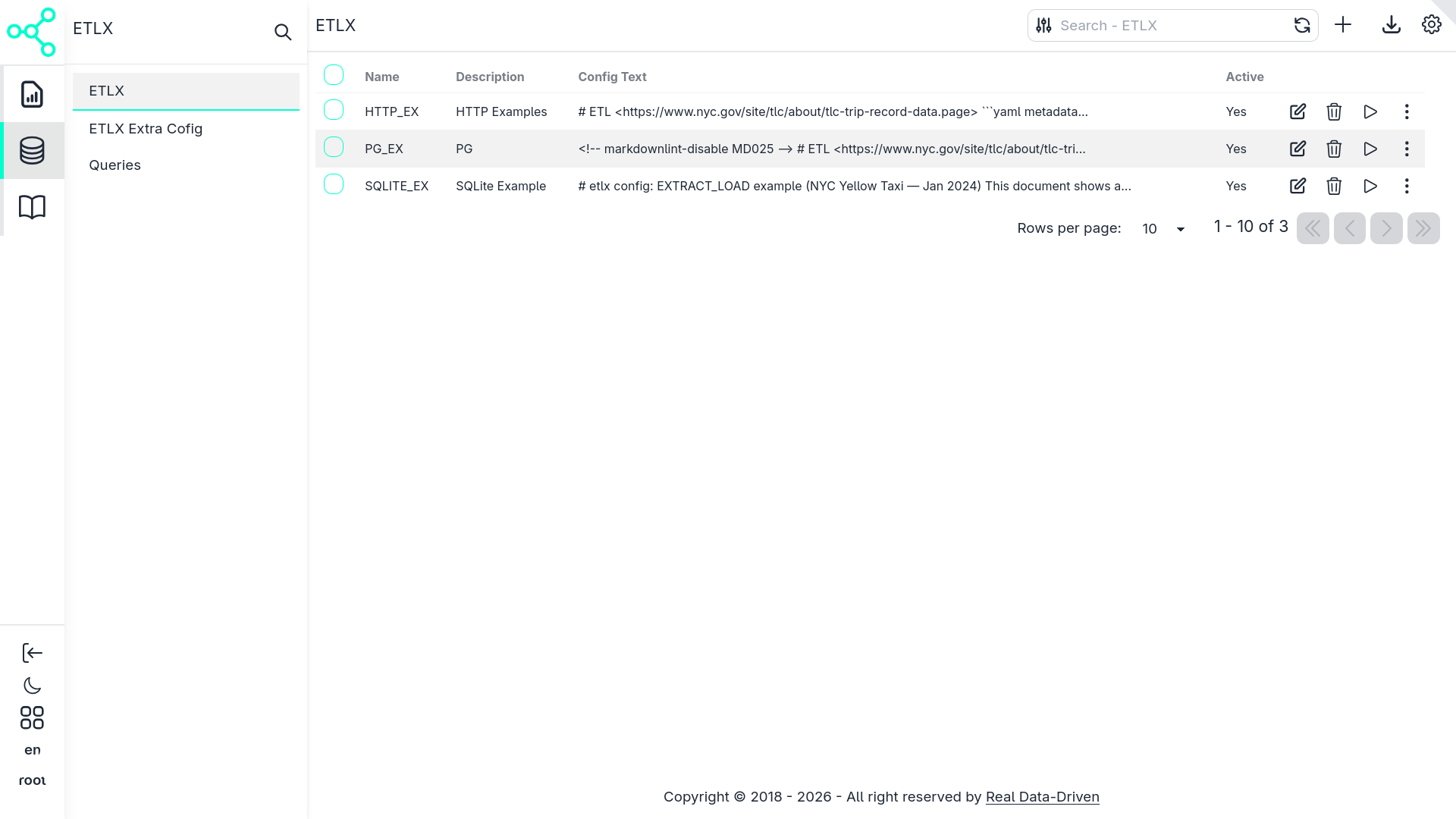
Creating a New Pipeline
Clicking the Add/Edit button opens the ETLX configuration form.
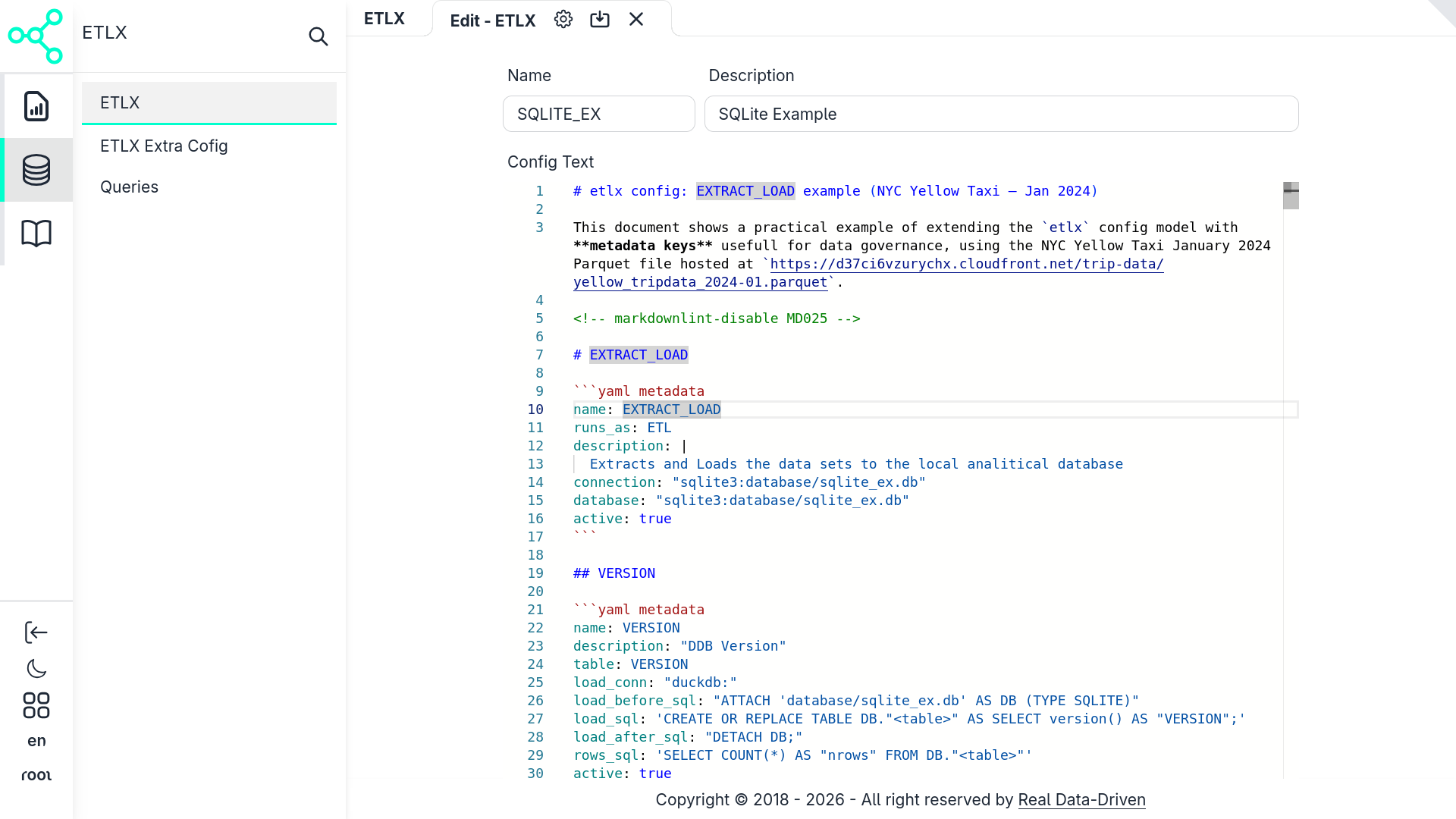
In this form you:
- Give the pipeline a name
- Paste or write the ETLX configuration
- Save the record
Once saved, the configuration becomes an executable ETLX pipeline.
Entering the Pipeline Workflow
After saving, a new record appears in the CRUD table.
Each record includes a play icon ▶️. Clicking it opens the pipeline workflow view.
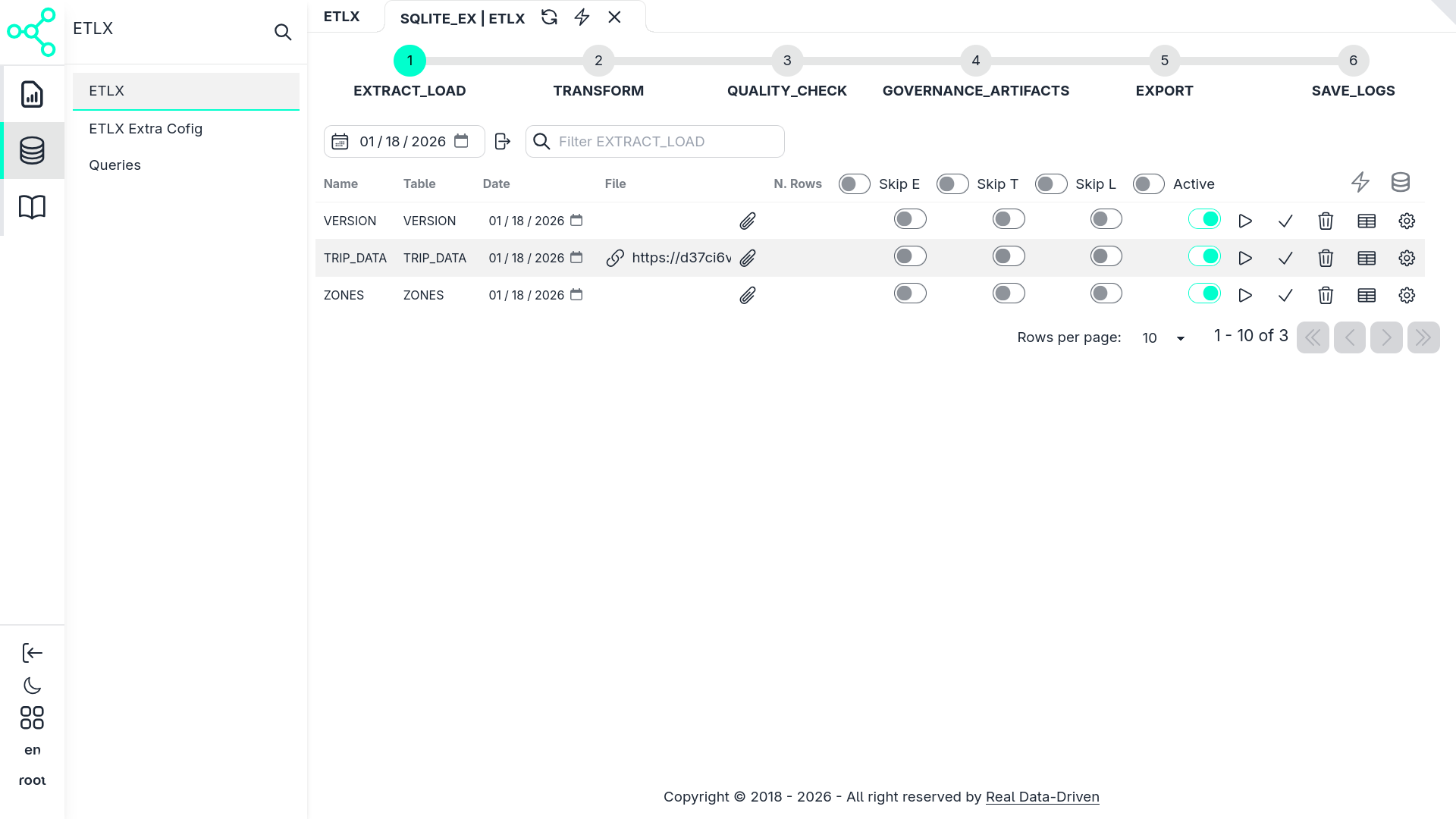
In this view, the markdown configuration materializes into a structured pipeline:
- High-level stages (EXTRACT_LOAD, TRANSFORM, QUALITY_CHECK, etc.)
- Individual executable items inside each stage
- Execution controls per item or per stage
From here, the pipeline can be:
- Explored
- Executed entirely
- Executed partially
- Executed step-by-step
- Re-run safely, thanks to validation rules
Pipeline Configuration Overview
This example use the ETLX sqlite exemple also used in this doc in ETLX & Data Pipelines use to demostrate a basic setup with an embbed database with no databse server setup:
The configuration below represents a complete ETLX pipeline.
It demonstrates how ETLX extends a traditional ETL definition with:
- Rich metadata
- Governance context
- Declarative execution logic
- Embedded SQL
- Reusable QueryDocs
The dataset used is hosted at:
https://d37ci6vzurychx.cloudfront.net/trip-data/yellow_tripdata_2024-01.parquet
EXTRACT_LOAD — Ingestion Stage
The pipeline begins with the EXTRACT_LOAD stage.
  name: EXTRACT_LOAD
runs_as: ETL
description: |
  Extracts and loads datasets into the local analytical database.
connection: "sqlite3:database/sqlite_ex.db"
database: "sqlite3:database/sqlite_ex.db"
active: true
What this means
Defines a logical stage in the pipeline
Groups multiple extraction and loading tasks
Declares:
- Execution type (
ETL) - Target database
- Activation state
- Execution type (
In the UI, this appears as a top-level expandable section.
VERSION — Environment Validation
  name: VERSION
description: "DuckDB version check"
table: VERSION
load_conn: "duckdb:"
load_before_sql: "ATTACH 'database/sqlite_ex.db' AS DB (TYPE SQLITE)"
load_sql: 'CREATE OR REPLACE TABLE DB."<table>" AS SELECT version() AS "VERSION";'
load_after_sql: "DETACH DB;"
rows_sql: 'SELECT COUNT(*) AS "nrows" FROM DB."<table>"'
active: true
Purpose
This step:
- Verifies the DuckDB runtime version
- Writes it into the database
- Acts as a sanity check before loading data
In the workflow UI, this is a single executable item with a row count result.
TRIP_DATA — Core Dataset Ingestion
  name: TRIP_DATA
description: "Extracting NYC Yellow Taxi trip data"
table: TRIP_DATA
load_conn: "duckdb:"
load_before_sql: "ATTACH 'database/sqlite_ex.db' AS DB (TYPE SQLITE)"
load_validation:
  - type: throw_if_not_empty
    sql: FROM "DB"."<table>" WHERE "ref_date" = '{YYYY-MM}' LIMIT 10
    msg: "This date is already imported — aborting to avoid duplicates."
load_sql: update_trip_data_table
load_on_err_match_patt: '(?i)table.+does.+not.+exist'
load_on_err_match_sql: create_trip_data_table
load_after_sql: DETACH "DB"
_query_doc: QUERY_EXTRACT_TRIP_DATA
file: "https://d37ci6vzurychx.cloudfront.net/trip-data/yellow_tripdata_{YYYY-MM}.parquet"
active: true
Key concepts demonstrated
- Parameterized ingestion (
{YYYY-MM}) - Idempotency checks via
load_validation - Automatic table creation on first run
- Separation of SQL logic via QueryDocs
In the UI, this step shows:
- Validation results
- Executed SQL
- Number of rows loaded
QUERY_EXTRACT_TRIP_DATA — QueryDoc
QueryDocs define reusable, documented SQL logic.
  name: QUERY_EXTRACT_TRIP_DATA
is_query: true
owner: taxi-analytics-team
source:
  uri: "...yellow_tripdata_2024-01.parquet"
  format: parquet
Each field inside the QueryDoc:
- Has metadata (description, type, owner)
- Contributes a fragment to the final SQL query
- Can be reused by multiple pipeline steps
This structure enables automatic governance artifacts later.
TRANSFORM — Analytical Transformations
  name: TRANSFORM
runs_as: ETL
description: Transforms raw data into analytical outputs
connection: "sqlite3:database/DB_EX_DGOV.db"
active: true
Example: MostPopularRoutes
  name: MostPopularRoutes
description: Most common pickup/dropoff routes
transform_conn: "duckdb:"
transform_sql: trf_most_popular_routes
active: true
This step aggregates trips and produces a curated analytical table.
In the UI, this appears as:
- A transformation step
- With dependencies on previously loaded datasets
QUALITY_CHECK — Data Validation
  runs_as: DATA_QUALITY
description: Runs data quality rules
active: true
Rule Example
  name: Rule0001
description: Validate payment_type domain
These rules:
- Run as first-class pipeline steps
- Can fail, warn, or auto-fix data
- Are fully auditable
GOVERNANCE_ARTIFACTS — Documentation as Output
This stage demonstrates a key ETLX concept:
Governance artifacts are generated, not written manually
The DATA_DICTIONARY export renders an HTML document from metadata defined throughout the pipeline.
This includes:
- Field descriptions
- Ownership
- Lineage
- Quality rules
EXPORT & SAVE_LOGS — Observability
The final stages show how ETLX:
- Exports logs to Parquet
- Persists execution metadata
- Evolves log schemas dynamically
This makes ETLX pipelines observable by design, enabling dashboards like the Logs Dashboard you documented earlier.
Job Scheduling & Automation
Native cron-style job scheduling for ETLX pipelines in Admin > Jobs
Summary
This example demonstrates how ETLX enables:
- Declarative pipelines
- Metadata-first design
- Strong governance
- Reproducible execution
- UI-driven exploration
All from a single markdown configuration.
Last updated 19 Jan 2026, 20:05 -01 .